Baby Shark World for Kids
- 3.2
- Rating
- 1.00M
- Installs
- Free
- Price

 Analysis by App-foxy
When a child asks for Baby Shark videos, songs, and something to do afterward, I usually want more than a quick distraction. I want an experience that is easy to start, simple enough for a young child to explore, and broad enough to turn a few minutes of screen time into a small learning routine. That is the role Baby Shark World for Kids tries to fill. It is a free education app from The Pinkfong Company, built around the familiar Baby Shark world and aimed at children in the Everyone age group.
My first impression is that this is less like a traditional lesson app and more like a child-friendly entertainment hub with learning activities woven into it. The appeal is immediate for children who already recognize Baby Shark, while parents get a single place to move from watching to simple activities. That combination works well in short sessions, although it also means the app will not satisfy every family looking for a structured curriculum or a quiet, distraction-free study tool.
From a familiar request to a usable activity
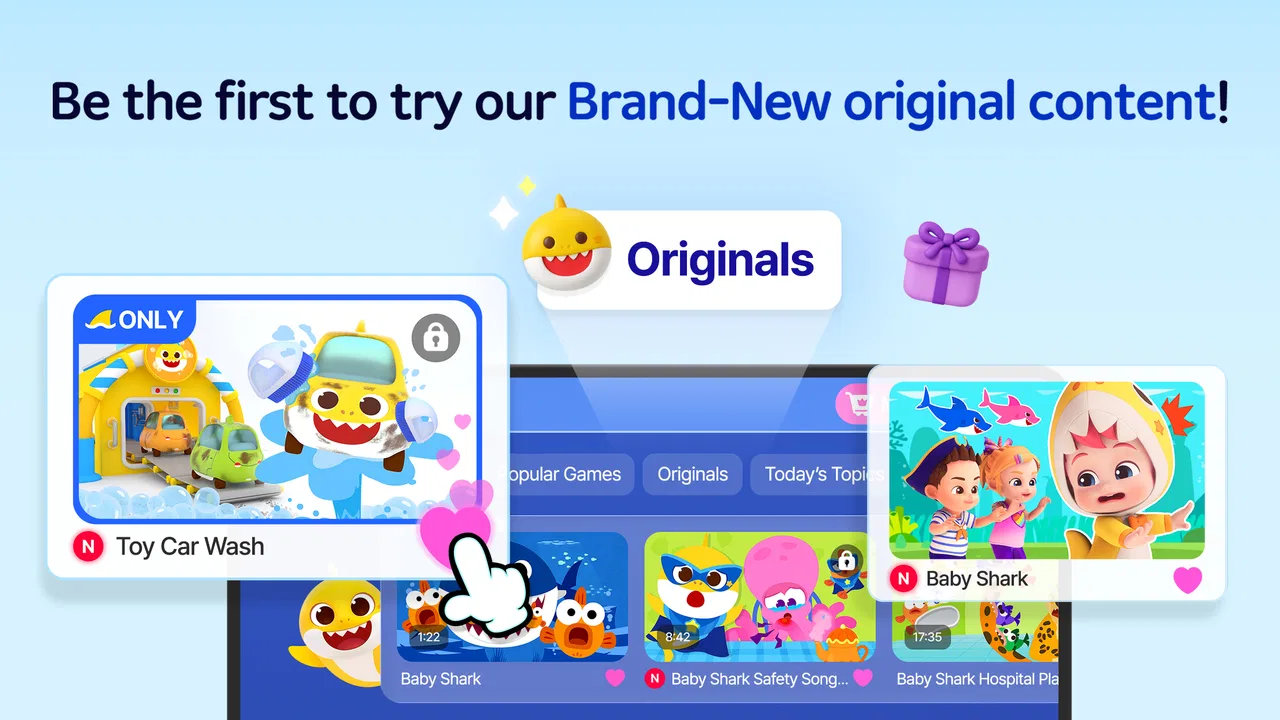
The starting condition is easy to imagine: a child is restless, asks for Baby Shark, and reaches for a phone or tablet. Instead of opening a video service and then searching for a suitable clip, the child can enter this dedicated app and remain inside a themed environment. The store summary presents it as a place for the latest Baby Shark releases and kids’ learning activities, and in practice that positioning matters because it connects the character children want with activities parents may find more purposeful.
You May Also Like

 Blood Strike: 2.5 Anniversary
Blood Strike’s Loadouts Turn Every Drop Into a Tactical Gamble
A close look at Blood Strike’s custom loadouts: how fast access to signature weapons reshapes its battle royale rhythm, rewards preparation, and narrows the gap between fights.

 Pandora - Music & Podcasts
Pandora’s Music Is Easy to Start, but Harder to Recover
Pandora’s strength is its low-effort path from a seed to a station. Its weak spot is how much confidence it asks you to place in connection, setup, and quiet recovery.

 8 Ball Pool
 Is Built on Rivalries, Rematches, and Routine
A close look at the rivalries, rematches, shared routines, and unanswered safety questions that turn a quick pool match into a persistent mobile community.

 Samsung Music
’s Quiet Strength Is Playing What You Already Own
Its reach comes less from spectacle than from dependable access to a personal library. That simplicity is both the app’s strongest retention engine and its ceiling.

 AccuWeather: Weather Radar
AccuWeather Review: A Quick, Clear Forecast for Everyday Decisions
For everyday plans, the best forecast is the one you can understand quickly. AccuWeather makes rain timing, radar, and local conditions easy to act on, with a few trade-offs.

 Hill Climb Racing
Why Hill Climb Racing Still Turns Crashes Into One More Run
A tiny car, a bumpy hill and one more upgrade: Hill Climb Racing keeps resurfacing because its simple chaos makes every near-miss feel personal.
More From Our News Desk



I found the strongest use case is a short, supervised routine. A child can begin with familiar content, spend some time with an activity, and then hand the device back to an adult without the session needing to become a long open-ended browsing trip. That is a better fit for a morning transition, a waiting room, or a calm activity before dinner than for a full replacement for preschool teaching.
The app is available at no upfront cost, which makes trying it straightforward. The important catch is that in-app purchases range from $8.99 to $107.88 per item. I would therefore treat the free download as an invitation to inspect the experience, not as a promise that every part of the catalog is included. Before handing over the device, I would explore the available sections myself and decide which parts fit the family’s budget and screen-time rules.
Its audience is broad in age labeling, but the design is clearly aimed at young children rather than older students. That distinction affects expectations. A child who enjoys songs, recognizable characters, repetition, and simple interactive tasks is likely to feel at home. An older child seeking spelling progression, mathematics practice, or a detailed learning dashboard will probably find the experience too light.
How I would set up the first session
I would begin by opening the app without immediately giving the device to the child. The first pass is useful for learning where the main content areas are, identifying what can be accessed freely, and noticing which options may lead toward a purchase. This small preparation step prevents the common handoff problem in children’s apps: the child is ready to play, but the adult is still trying to understand the screen.
Next, I would choose one clear starting point instead of presenting every available choice. For a child already excited about Baby Shark, familiar video or music content is the natural entry. For a child who is tired of passive watching, I would move directly toward the learning activities. The goal is to make the first decision for the child, then let the child take over once the activity begins.
That workflow is more effective than treating the app as background entertainment. If the child starts with a song, I would follow it with one related activity and stop there. A small sequence gives the session a beginning, middle, and end. It also makes it easier to judge whether the educational side is genuinely useful for that particular child rather than assuming that a colorful theme automatically creates learning.
The practical advantage is the handoff from familiar content to an activity without changing apps. In a typical alternative, a parent might play a Baby Shark video in a general video service and then search separately for a puzzle, coloring activity, or early-learning exercise. Here, the themed environment is designed to keep those steps together. That saves time and reduces the chance of a child wandering into unrelated recommendations.
What the child does, and what the adult does
Once the child is engaged, the adult’s role changes from navigator to observer. I would watch for whether the child is responding to the activity itself or merely tapping through because the characters are attractive. That difference is important. A child may remember the song and enjoy the animation while gaining very little from the learning task. Short questions from an adult can turn passive use into a more active exchange: asking what the child noticed, what comes next, or why an answer was chosen.
This is where the app works better as a shared tool than as an electronic babysitter. Its theme can open the door, but the adult helps connect the activity to real language, counting, memory, or observation. Even a brief conversation after an activity can make the session feel less like isolated screen time.
I also prefer giving the child a limited choice. Rather than asking which of many sections to open, I might offer two options: a song first or an activity first. That keeps the child involved while avoiding a long search through menus. It is a small workflow adjustment, but it can reduce frustration and make the app feel more manageable for children who are not yet comfortable navigating independently.
The developer, The Pinkfong Company, has a recognizable advantage here: Baby Shark is already a strong visual and musical cue for many young children. Familiarity reduces the effort needed to explain the setting. A child does not have to learn a new fictional world before engaging with the content, which is one reason the app can work well during short periods when attention is limited.
Where the handoffs are smooth
The most successful handoff is from a parent’s intention to a child’s independent participation. A parent wants a suitable activity, opens a known children’s brand, and then lets the child interact with content that feels inviting. The app’s education category is relevant because it frames the experience as more than a media player, while the Baby Shark identity keeps the entry point approachable.
Another useful handoff is between entertainment and repetition. Young children often learn through hearing or seeing something several times, and a familiar character can make repetition feel enjoyable instead of like homework. I would use that strength for routines such as recognizing colors, practicing simple words, or recalling a sequence from an activity, but I would not assume that repeated tapping alone equals mastery.
The handoff from child to adult is equally important. After a session, I would ask the child to demonstrate one thing from the activity away from the screen. If the child can sing a line, identify an object, explain a choice, or repeat a simple pattern, the app has provided a useful prompt for continued learning. If the child remembers only the music, that is still entertainment, but it is a sign to adjust how the app is being used.
This approach also answers a question many parents have: can a young child use it alone? A child who is already comfortable with touchscreens may manage the basic interaction, but I would not assume full independence. Young users can accidentally move into unfamiliar areas, become frustrated by a choice they do not understand, or encounter purchase prompts. Initial guidance and occasional supervision remain sensible, especially because the app includes paid items.
The result after a normal short session
After a well-managed session, I see the app’s main result as a successful transition: the child gets the Baby Shark experience they wanted, while the adult has a chance to add a small learning step. That result is modest, but it is realistic. This is not the kind of app I would use to measure a child’s progress through a formal program. I would use it to create a repeatable, low-pressure activity around music, characters, and simple interaction.
Its audience reach is substantial, with over 1 million installs, and the average rating is 3.5 from around 2.2 thousand ratings. I read those figures as a reminder to keep expectations balanced. The app clearly has enough appeal to attract a large audience, but the rating does not suggest that every family finds the experience equally smooth. In my view, that makes personal fit more important than brand recognition.
The current version is 3.17, and the app runs on Android 7.0 or later. For a parent deciding whether an older household device can be reused, the operating-system requirement is worth checking before planning around it. A compatible device is only the first step, though; the screen size, sound level, and available storage can also affect whether a child’s session feels comfortable.
I would especially recommend using a tablet when possible, because young children benefit from larger touch targets and a clearer view of visual details. On a phone, the experience may still be convenient for travel, but small controls and close viewing can make the session less relaxed. For a car journey or appointment queue, a phone is practical; for a planned activity at home, a larger screen is the better handoff.
How it compares with the usual alternatives
Compared with a general video platform, this app offers a more focused Baby Shark setting and a clearer path toward children’s activities. A general platform may provide a larger range of videos, but it can also introduce unrelated recommendations and make it harder for an adult to control the direction of the session. The dedicated environment is preferable when the child specifically wants Baby Shark and the parent wants fewer steps between content and activity.
Compared with a traditional preschool learning app, the balance is different. A curriculum-focused alternative may offer clearer progression, more explicit skill categories, and stronger tools for tracking development. Baby Shark World for Kids is more approachable for a child who resists formal lessons, but it may feel less systematic to a parent who wants a planned sequence. I would choose this app for motivation and familiarity, and a structured learning product for sustained skill practice.
Compared with standalone music or sing-along apps, it has the advantage of combining the character world with educational interaction. The trade-off is that families who want only songs may find the extra sections unnecessary, while families seeking deep learning may find them insufficient. The right choice depends on whether the desired outcome is a cheerful themed activity or a measurable academic routine.
There is also a meaningful difference from offline play. Blocks, picture books, drawing, and pretend play offer physical interaction and often invite more conversation. The app is convenient when those materials are unavailable or when a child needs a familiar bridge into a quiet moment, but I would not let its convenience replace hands-on activities. Its best role is as one option in a wider routine.
Where the workflow breaks down
The first point of friction is the gap between the free entry point and the paid catalog. A parent can download the app without paying, but the presence of in-app purchases means the experience needs adult inspection before independent use. The listed purchase range is wide enough that I would not allow a child to make choices near payment screens. This is not a reason to reject the app, but it does change how I would set it up.
The second weakness is the risk of overstimulation. Bright characters, familiar music, and a collection of activities can make it difficult for some children to stop. If the child becomes upset when the session ends, the app has not failed technically, but the workflow has failed as a family routine. I would decide the stopping point before opening it and give a warning before the final activity rather than ending suddenly.
Another limitation is that the Baby Shark theme can be either the app’s greatest strength or its biggest barrier. Children who love the brand may engage immediately. Children who are tired of the songs, prefer calmer visuals, or do not know the characters may have little reason to stay. In those cases, a neutral learning app, an audiobook, or an offline activity would be a better choice.
I would also skip it when the main requirement is advanced educational structure. If a parent needs detailed progress records, a carefully sequenced lesson plan, or content aimed at older learners, this is not the tool I would put first. Its value comes from accessible themed practice, not from replacing a teacher or a comprehensive early-learning program.
Small adjustments that improve the outcome
My first tip is to create a two-part rule: one entertainment choice followed by one activity. That keeps the familiar Baby Shark appeal while giving the session a clear educational handoff. It also prevents the child from spending the entire time searching for the next song or section.
My second tip is to use the app as a conversation starter rather than testing the child while the activity is running. Wait until the screen is paused or finished, then ask the child to explain or show something. This reduces pressure and gives the adult a better sense of whether the activity was understood.
My third tip is to prepare an offline follow-up that takes less than a few minutes. A child might draw a favorite character, act out a movement from a song, sort household objects by color, or repeat a simple sequence noticed in the app. This turns the screen session into an input that leads to a real-world outcome, which is more valuable than simply moving from one digital activity to another.
For families sharing one device, I would also keep the adult’s first exploration separate from the child’s first session. That avoids interruptions and makes the handoff feel intentional. If several children use the same device, each child may respond differently to the music and activities, so I would watch for individual preferences rather than assuming the Baby Shark theme works equally well for everyone.
My final recommendation
Baby Shark World for Kids makes the most sense for families who want a familiar character to lead a child from songs and releases into simple learning activities. I like its ability to turn a child’s existing interest into a more purposeful short session, especially when an adult chooses the starting point and follows up with conversation or offline play.
I would recommend trying it for children who already enjoy Baby Shark, parents who want a focused alternative to general video browsing, and families comfortable supervising a free app that includes paid items. I would be more cautious for children who need calm, minimal stimulation, for parents seeking formal progress tracking, and for anyone who wants a completely open-ended free experience without purchase considerations.
In the end, I see it as a themed bridge rather than a complete learning system. Used with a clear beginning, a guided handoff, and a planned stopping point, it can make a short screen session more useful and easier to manage. Used as an unlimited replacement for play, teaching, or supervision, it is much less convincing. That honest middle ground is where this app works best.
FAQs for Baby Shark World for Kids
01What is Baby Shark World for Kids?
Baby Shark World for Kids is an interactive educational app designed for children. It features engaging games, videos, and activities centered around the popular Baby Shark character. The app aims to promote learning through fun, offering a safe and colorful environment for young users to explore various educational themes.
02Is Baby Shark World for Kids safe for my child?
Yes, Baby Shark World for Kids is designed with child safety in mind. It features a secure environment with age-appropriate content and no third-party advertisements. The app ensures that your child can enjoy learning and playing without exposure to unsuitable material or external links.
03What age group is Baby Shark World for Kids suitable for?
Baby Shark World for Kids is primarily designed for children aged 2 to 6 years old. The app offers content that is suitable for early childhood development, including interactive games, songs, and educational activities that cater to the cognitive and motor skills typical of this age group.
04Does Baby Shark World for Kids require an internet connection?
Baby Shark World for Kids can be used both online and offline. While an internet connection is required for downloading new content and updates, many activities and games can be accessed offline. This makes it convenient for use in environments where internet access may be limited.
05Are there in-app purchases in Baby Shark World for Kids?
Yes, Baby Shark World for Kids includes some in-app purchases. These are primarily for unlocking additional content or features. However, all purchases are protected by parental controls to prevent unauthorized transactions, ensuring that parents can manage what is accessible within the app.
Pros
- Engaging animations captivate young children.
- Interactive games enhance learning experiences.
- Colorful graphics keep kids entertained.
- Easy navigation suitable for toddlers.
- Offline mode available for uninterrupted fun.
Cons
- Limited content available without subscription.
- Repetitive music might annoy parents.
- In-app purchases can be costly.
- Requires regular updates for new content.
- Might drain battery quickly on older devices.

Baby Shark World for Kids
Gallery